Release 0.1.0 of `windot` is here! Here's how you can try it out.
Announcing the release of version 0.1.0 of `windot`, an emoji picker for Linux systems.
So it’s been a while since I actually came close to being done with a project, but I’ve finally made something worth using again!
What is it?
If you’re running Linux and are in search of a decent emoji picker, consider using windot! I just decided to finally release version 0.1.0 today after a long time of no updates to the codebase. It’s a simple GTK application that opens up, waits for you to pick an emoji, copies it to the clipboard, and closes again. It does one thing and does it well.
Here’s a little bit of a preview of what it looks like:

Installation
Arch Linux
On Arch Linux, I posted an AUR package that builds it from source for you. If you use an AUR helper like yay, you can install it with:
1
yay -S windot-git
Ubuntu
Just run the following commands in your terminal to install it:
1
2
3
4
5
6
7
8
9
10
11
12
13
# Download the dependencies needed to build from source
sudo apt install gcc libgtk-4-dev pkg-config libadwaita-1-dev

# Clone the repo
git clone https://github.com/Lamby777/windot.git
cd windot

# Build it and install it
make && sudo make install

# Clean up
cd ..
rm -rf windot
Other Distros
It shouldn’t be too difficult as long as you can figure out how to install the dependencies listed above in the Ubuntu section. You can ignore the first line of that script and just run the rest of the commands, since they’ll do the same thing on any distro.
Usage
Once you have it installed, run the windot command in your terminal and make sure it works as expected. If it does, you can add it to your desktop environment’s shortcuts registry and make some keybind like Win+. (get it? win and dot? 😅) to open it up quickly whenever you need it.
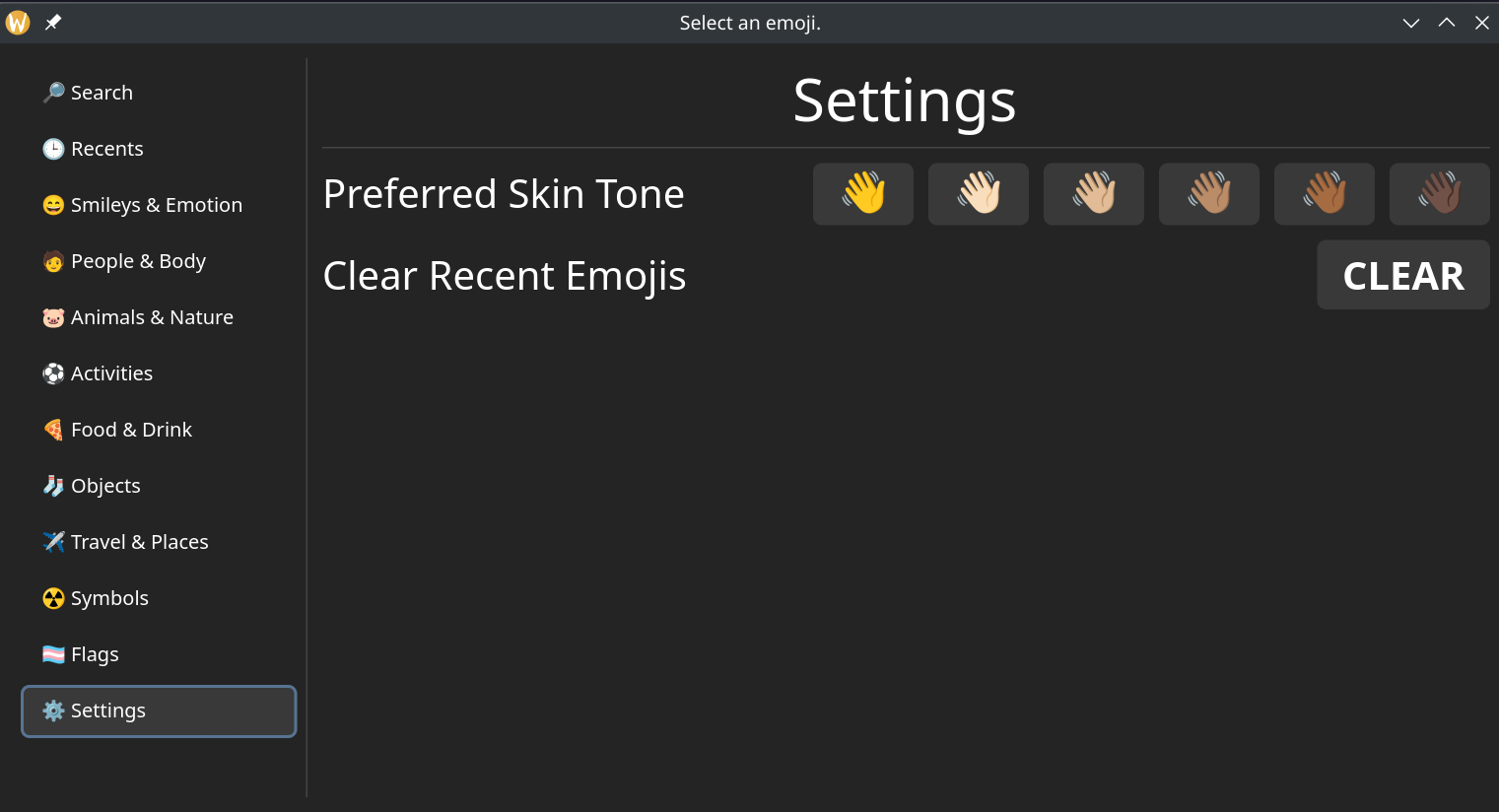
To pick a skin color for an emoji, you can right click on the emoji to switch to a preview of skin tones. The settings page also has an option for you to set a default skin tone, along with clearing your recent emojis.
Looking Ahead
This is only the first release, and although I haven’t found any bugs myself in daily use, it’s still probably not perfect. File an issue if you find a bug or have a feature request.
EDIT: As I was writing this post, I found and fixed a small bug. So, yeah, it’s not perfect. 😆
Clipboard Issues?
My friend ran into a problem with the emojis not being saved to their clipboard manager. They were using klipper from KDE, and if I remember correctly, managed to get some fix working on their local copy. It may be ready soon, or it may not. I have no idea. Regardless, keep in mind that systems using klipper as the clipboard manager might not run windot properly for now.
Direct Typing
One feature you might notice is missing is the ability to click an emoji to type it directly into a text field. This is something I really miss from Windows, where typing emojis is fairly straightforward and doesn’t involve the clipboard at all. All the other emoji pickers I’ve seen on Linux don’t have it either. This is the only real feature left to add, so it’s my main focus for the app right now.
Packaging
I’m still in the process of figuring out how to package this for distros. My main focus as of writing this is Arch Linux. I just set up a Makefile, so for the most part packages should just specify the dependencies listed above, run make and sudo make install, and they’ll be done.
Nerd Stuff
Shadowing is different from marking a variable as mut because we’ll get a compile-time error if we accidentally try to reassign to this variable without using the let keyword. By using let, we can perform a few transformations on a value but have the variable be immutable after those transformations have been completed.
Alright, are the non-nerds gone yet? Nice. 😆
emojis
I actually really enjoyed making this project because of this one crate. It provides a way to iterate over every single emoji in the unicode standard, along with some types for working with emojis. Iterators are my favorite part of working on Rust code! 😄
The guy who made it was very quick to add serde support as well when I asked about it and gave a use case (preferred skin tone serialization), so it’s clearly still being looked at and stuff. Here’s an example of some code referencing the crate, which gets a list of every single emoji, including skin tone variants.
1
2
3
4
5
6
7
8
9
10
11
fn every_emoji_and_variants() -> impl Iterator<Item = &'static Emoji> {
    emojis::iter().flat_map(|e| {
        let tones = e.skin_tones();
        let default = std::iter::once(e);

        let mut tones_only = tones.into_iter().flatten();
        tones_only.next();

        default.chain(tones_only)
    })
}
gtk4
Having absolutely zero knowledge on how to write a GTK app before starting this project, it was pretty interesting to see how the people behind this crate managed to turn GTK’s inheritance-based object-oriented design into something that still works intuitively in Rust. It really reminds me of the gdext project, in the sense that you can cast between types and that sort of stuff. It’s pretty cool. I had no issues specifically with the crate, and if you’re thinking of writing a simple GUI application in Rust, I’d highly recommend it, along with bookmarking the GTK Widget Gallery in your browser. It’s like a visual documentation page for any GTK UI component you’d like to code up into your app.
Conclusion
I hope you enjoy using windot for all your emoji-picking needs as much as I enjoyed working on it so far. I’m excited to see what the community thinks of it and what features they’d like to see next. Again, if you have any ideas, feel free to open an issue on the GitHub repo!